Spectro™ application note · Patient Lifts
Battery Testing for Patient Lifts
Check battery reserve before a lift returns to service.
A lift can indicate a full charge and still have reduced usable capacity. Compare battery condition with the lift’s expected use between charges and investigate packs that repeatedly run down early.

30 sec
Typical test time for supported batteries
Battery-specific
Confirm test matrix compatibility
Multi-Model EIS
Non-invasive battery screening
Screen batteries during scheduled service
Record the battery model and service history. Follow the lift manufacturer’s inspection, functional test, and replacement procedures before returning the lift to use.

From a rapid test to a service decision
Select a matrix
Choose a supported test matrix for the battery and application. Ask Cadex about compatibility before testing.
Measure battery condition
Spectro uses Multi-Model electrochemical impedance spectroscopy to assess capacity and state of charge without a full discharge test.
Review the result
Compare the reading with the required reserve and the battery’s history. Use the result to decide whether the equipment needs further checks or service.
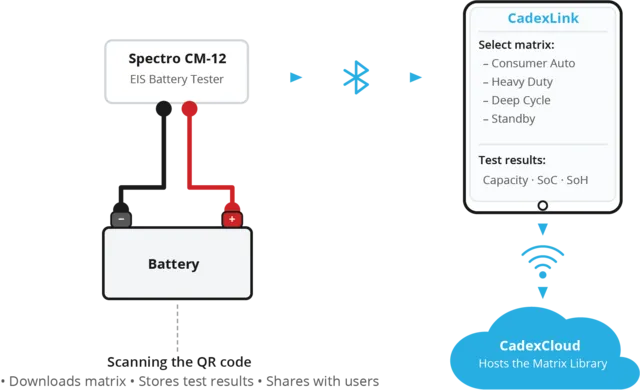
Keep a record of each battery test
CadexLink collects test results from compatible Spectro devices and can send them to CadexCloud. Use battery identifiers to find prior records and track changes between service intervals.
Explore CadexCloudFind a test matrix for your batteries
Talk with Cadex about battery compatibility, test settings and service workflows.